🔍 Read the full analysis: How To Choose Among The 8 Best Drawing Tablets For Digital Art In 2027 on ThorstenMeyerAI.com

Get business pricing on tech for your team
- Business-only prices and quantity discounts
- Tax-exempt purchasing
- Multiple users, one account, clear invoices
TL;DR
This is a buying guide, not a report of a new product launch: it compares eight drawing tablets for different digital-art setups. The source favors the HUION Kamvas 13 (Gen 3) overall, but says the right choice depends on whether you want a computer-connected display, a screenless tablet or standalone use.
A buyer’s guide names the HUION Kamvas 13 (Gen 3) its top overall pick among eight drawing tablets for digital art, while recommending other models for larger screenless work areas, compact portability or standalone use, as detailed in the original analysis. The comparison matters because these devices require different setups: some connect to a computer, while others can run supported drawing apps on the tablet itself.
The guide ranks the Kamvas 13 (Gen 3) first for artists who want to draw directly on a display and use dual dial controls, with more advice in this drawing tablet selection guide. It describes the HUION Inspiroy H1060P as a value option for people who already have a computer and want a larger screenless surface. The H1060P offers more work area than the compact H640P and Wacom Intuos Small, according to the source.
For artists seeking to work without a computer connection for supported tasks, the guide points to the Frunsi RubensTab T11 Pro and PicassoTab A10. It also lists two XP-Pen Artist 13.3 Pro V2 entries that appear closely related. Buyers are advised to check each listing’s exact specifications and included accessories rather than infer a meaningful distinction from the names alone.
The comparison weighs device type, active drawing space, portability, controls and compatibility, rather than treating advertised pen specifications as the sole measure. The source does not provide independent testing results or a detailed specification table for every model, so its rankings are best read as recommendations based on stated tradeoffs, not as a verified performance benchmark.
The 8 picks
- 1
 HUION Kamvas 13 (Gen 3) 13.3-Inch Drawing Pen Display with Dual Dial and StandView on Amazon →
- 2
 PicassoTab 10" Standalone Drawing Tablet (A10)View on Amazon →
- 3
 XP-Pen Artist 13.3 Pro V2 Drawing Tablet with Screen, 16K Pressure Levels, Re…View on Amazon →
- 4
 XPPen Artist 13.3 Pro V2 Drawing Tablet with ScreenView on Amazon →
- 5
 Frunsi RubensTab T11 Pro Standalone Drawing TabletView on Amazon →
- 6
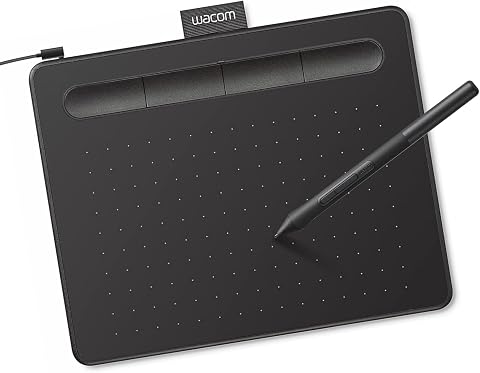 Wacom Intuos Small Wired Drawing Tablet with PenView on Amazon →
- 7
 HUION Inspiroy H1060P Graphics Drawing Tablet, 10 x 6.25 inView on Amazon →
- 8
 HUION Inspiroy H640P 6 × 4-Inch Drawing Tablet with Battery-Free StylusView on Amazon →
Match the Tablet to Your Workflow
The biggest choice is not simply which tablet has the most features; it is how the artist wants to work. A display tablet places the image under the pen, a screenless model separates the drawing surface from the computer monitor, and a standalone device can reduce the need to carry or connect a computer for supported apps. Each setup can affect cost, portability, software access and the time needed to get started.
Workspace also changes the experience. A compact tablet may suit a small desk or travel, but can feel restrictive for broad strokes or detailed work. A larger surface gives more room for hand movement, while taking up more desk space. Checking computer, operating-system and app compatibility before purchase can prevent a mismatch that a higher advertised pressure level or extra shortcut cannot solve.
Products Worth Considering

Logitech MX Mechanical Wireless Illuminated Keyboard, Tactile Quiet, Graphite

Sony WH-1000XM6 Wireless Noise-Canceling Headphones, Black

LG UltraGear 32-inch QHD Curved Gaming Monitor, 180Hz, 1ms, AMD FreeSync
As an affiliate, we earn on qualifying purchases.
Three Setups, Different Tradeoffs
The source organizes the eight options around three broad categories: screen tablets for direct-on-display drawing, pen tablets that rely on a separate computer screen, and standalone tablets that run supported software without a computer connection. These categories are not interchangeable, and a model’s usefulness depends on the buyer’s existing devices and preferred routine.
Its ranking places the Kamvas 13 (Gen 3) first for the combination of display and controls, with the H1060P next as a larger computer-dependent option. The H640P and Intuos Small are positioned around portability, while the standalone models serve buyers who prioritize a self-contained setup. The guide cautions that the two XP-Pen listings may be closely related and should be checked individually.
Check Listings and Compatibility
The supplied material does not establish that the rankings come from laboratory testing, long-term use or a standardized comparison. It also does not specify the exact prices, current availability, operating-system support, app lists or package contents for each listing. Those details can change, so readers should confirm them with the seller or manufacturer before buying.
It is also unclear whether the two XP-Pen entries are separate configurations or duplicate listings for closely related products. The source advises checking exact specifications and accessories, but does not resolve the distinction. Standalone operation likewise does not mean that every computer-based art app or workflow will be supported.
Verify the Setup Before Buying
Before choosing, compare the exact model and package against the devices and apps already in use. For a screen tablet, check the computer’s compatibility and the required display connection, including whether an adapter or additional cable may be needed. For a screenless tablet, consider the size of the active area and whether drawing while looking at a separate monitor feels comfortable.
For standalone models, verify that the preferred drawing apps are available and suitable for the intended work. Buyers comparing the XP-Pen entries should check current product pages for configuration differences. The guide offers no later product announcement or testing milestone; the next useful step for readers is to confirm current specifications, price and support before ordering.
Key Questions
Which tablet does the guide recommend overall?
It names the HUION Kamvas 13 (Gen 3) as its best overall pick, particularly for artists who want a display and dual dial controls. It still requires a compatible computer and suitable connection.
Which option offers a larger screenless drawing area?
The guide recommends the HUION Inspiroy H1060P for buyers who already use a computer and want more workspace than the compact H640P or Wacom Intuos Small.
Are standalone tablets compatible with every drawing app?
No such broad compatibility is established in the source. Check that the specific apps and workflow you need are supported on the Frunsi RubensTab T11 Pro or PicassoTab A10 before buying.
Are the two XP-Pen Artist 13.3 Pro V2 listings different?
The source says they appear closely related but does not establish whether they differ. Compare the exact specifications and included accessories on each current listing.
Source: ThorstenMeyerAI.com