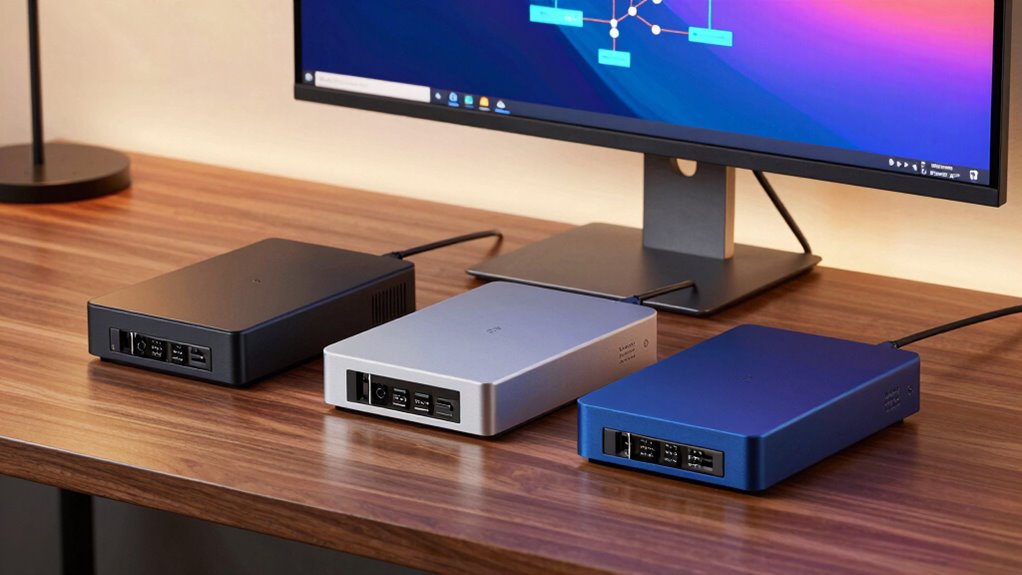

Choosing the right network backup device for a small team involves balancing capacity, ease of use, and features. For teams prioritizing private cloud access and security, the Synology DiskStation DS223j offers a compact, energy-efficient solution, though it’s limited to two bays. For those seeking a straightforward, all-in-one package, the BUFFALO LinkStation 210 includes pre-installed drives and simple setup, but with limited capacity. Meanwhile, the QNAP TS-233-US delivers robust multimedia and security features suitable for more tech-savvy users, but its limited RAM might restrict multitasking. This guide compares these options and more, highlighting their roles, strengths, and tradeoffs to help you choose the best network backup device for your small team.”

Get business pricing on tech for your team
- Business-only prices and quantity discounts
- Tax-exempt purchasing
- Multiple users, one account, clear invoices
Key Takeaways
- Two-bay NAS devices like Synology DS223j and QNAP TS-233-US offer good balance between capacity and cost for small teams.
- Including pre-installed drives, BUFFALO LinkStation 210 is ideal for quick setup and simple backups but limited to 4TB capacity.
- Advanced features like media transcoding and surveillance support are more prominent in Synology DS225+ and QNAP TS-233-US, suited for tech-savvy users.
- Entry-level options like UGREEN NAS DH2300 prioritize ease of use and large storage capacity for beginners but lack advanced features.
- Tradeoffs often involve capacity limits, setup complexity, and feature sets—prioritize what aligns with your team’s needs.
| Synology DiskStation DS223j (Diskless, 2-Bay NAS) |  | Best Overall for Private Cloud & Security | Brand: Synology | Model Number: DS223j | Number of Bays: 2 | VIEW ON AMAZON | See Our Full Breakdown |
| BUFFALO LinkStation 210 4TB 1-Bay NAS Network Attached Storage with HDD Included |  | Best for Easy Setup & All-in-One Storage | Brand: BUFFALO | Model Number: LS210D0401 | Capacity: 4TB | VIEW ON AMAZON | See Our Full Breakdown |
| Synology DS225+ Private Cloud Media Server – 2-Bay NAS with Intel CPU for Hardware Transcoding |  | Best for Media & Surveillance Enthusiasts | Brand: Synology | Model: DS225+ | Number of Bays: 2 | VIEW ON AMAZON | See Our Full Breakdown |
| UGREEN NAS DH2300 2-Bay Personal Storage for Beginners & Personal Users |  | Best for Beginners & Personal Use | Digital Storage Capacity: 64 TB | Hard Disk Interface: Serial ATA | Connectivity Technology: Ethernet, HDMI, SATA, USB | VIEW ON AMAZON | See Our Full Breakdown |
| QNAP TS-233-US 2-Bay Desktop NAS with ARM Cortex-A55 Quad-core Processor and 2GB RAM |  | Best for Multimedia & Security for Small Teams | Digital Storage Capacity: 2 GB | Hard Disk Interface: Serial ATA-600 | Connectivity Technology: SATA, USB | VIEW ON AMAZON | See Our Full Breakdown |
| network backup device for small teams under 3000 | Brand | Number of Bays | Warranty |
|---|---|---|---|
| Synology DiskStation DS223j | Synology | 2 | 2 years |
| BUFFALO LinkStation 210 4TB 1- | BUFFALO | 1 | 2 years |
| Synology DS225+ Private Cloud | Synology | 2 | 3 years |
| UGREEN NAS DH2300 2-Bay Person | — | — | — |
| QNAP TS-233-US 2-Bay Desktop N | — | — | — |
More Details on Our Top Picks
Synology DiskStation DS223j (Diskless, 2-Bay NAS)
The Synology DS223j stands out for its ability to create a private cloud, making it a secure hub for file sharing within small teams. Its energy-efficient, compact design makes it ideal for teams with limited space. Compared to other options, it offers robust backup support and surveillance features, but its two-bay limit could restrict future storage expansion. This device is better suited for teams that value security and remote access over maximum storage capacity. Its setup requires some technical know-how, which might be a hurdle for absolute beginners. Still, its support for multi-platform access and automated backups make it a versatile choice for most small teams.
Pros:- Creates a private cloud for secure data sharing
- Supports automated backups for multiple devices
- Includes surveillance features for security camera monitoring
- Energy-efficient and compact design
Cons:- Limited to 2 bays, restricting storage expansion
- Requires some technical knowledge for setup
- No included drives, only diskless
Best for: Small teams prioritizing secure private cloud access and surveillance.
Not ideal for: Teams needing large storage capacity or casual users who prefer plug-and-play simplicity.
- Brand:Synology
- Model Number:DS223j
- Number of Bays:2
- Warranty:2 years
- Built-In Media:Yes
- UPC:846504004768
Our verdict“A versatile, secure NAS ideal for small teams needing private cloud and surveillance features, but limited by storage capacity.”
BUFFALO LinkStation 210 4TB 1-Bay NAS Network Attached Storage with HDD Included
The BUFFALO LinkStation 210 offers an effortless solution for teams seeking straightforward centralized storage. Its included 4TB hard drive makes it an attractive pick for users who want everything ready to use out of the box, eliminating additional drives or complex configurations. Compared with Synology options, it sacrifices some expandability and advanced features but excels in ease of use. It’s ideal for small teams that prioritize quick deployment, basic file sharing, and reliable backups over extensive capacity or multimedia features. The limited capacity and moderate customer satisfaction ratings suggest it’s better for casual or temporary setups.
Pros:- Easy to set up and use
- Includes hard drives, saving additional costs
- Supports secure file sharing and automated backups
- 24/7 US-based support
Cons:- Limited to 4TB capacity with a single drive bay
- Some features may need compatibility checks
- Customer satisfaction is moderate
Best for: Small teams needing simple, ready-to-go storage and backups.
Not ideal for: Teams requiring more than 4TB of storage or advanced surveillance/streaming features.
- Brand:BUFFALO
- Model Number:LS210D0401
- Capacity:4TB
- Number of Bays:1
- Included Hard Drives:Yes
- Warranty:2 years
Our verdict“A straightforward, all-in-one NAS suitable for small teams that want quick, reliable storage with minimal fuss.”
Synology DS225+ Private Cloud Media Server – 2-Bay NAS with Intel CPU for Hardware Transcoding
The Synology DS225+ caters to teams that need more than just storage; it excels in media streaming and surveillance. Its Intel CPU enables hardware transcoding, supporting 4K media and up to 30 IP cameras, making it a flexible choice for small business or home use with multimedia needs. Compared to other 2-bay NAS devices, its three-year warranty and robust security features stand out. However, its setup can be complex for beginners, and the limited two-bay capacity might restrict high-availability configurations. This device is ideal for teams that want a combination of backup, media, and security surveillance, especially if multimedia workflows are a priority.
Pros:- Supports 4K media streaming and hardware transcoding
- Fast transfer speeds of 282 MB/s
- Multi-layered data protection including RAID and snapshots
- Supports up to 30 IP cameras
Cons:- May be complex for beginners to set up
- Limited to 2 drive bays, restricting expansion
- Requires network configuration for remote access
Best for: Small teams needing multimedia streaming, security, and data protection.
Not ideal for: Teams seeking maximum storage capacity or simple backup solutions without multimedia features.
- Brand:Synology
- Model:DS225+
- Number of Bays:2
- Processor:Intel CPU
- Transfer Speed:282 MB/s
- Supports IP Cameras:up to 30
- Warranty:3 years
Our verdict“A powerful NAS that combines multimedia, surveillance, and backup functions, best suited for tech-savvy teams with multimedia needs.”
UGREEN NAS DH2300 2-Bay Personal Storage for Beginners & Personal Users
The UGREEN NAS DH2300 is designed for those new to network storage, offering a simple, large-capacity solution for personal backups. Its support for up to 64TB makes it suitable for storing photos, videos, and personal files. Unlike more advanced models, it emphasizes ease of use over extensive features, making it ideal for beginners wanting a straightforward backup device. It does not support Wi-Fi, requiring wired Ethernet, and lacks support for virtual machines or Docker, limiting its expandability. This pick makes the most sense for users who want reliable, large storage without the complexity of advanced networking features.
Pros:- Easy to set up and use
- Supports up to 64TB capacity
- Fast transfer speeds of up to 125MB/s
- Includes AI features for photo organization
Cons:- No Wi-Fi support; wired connection required
- Limited to basic storage and backup functions
- No virtualization or advanced networking features
Best for: Beginners or personal users needing large, simple storage.
Not ideal for: Teams requiring multimedia streaming, surveillance, or virtual machine support.
- Digital Storage Capacity:64 TB
- Hard Disk Interface:Serial ATA
- Connectivity Technology:Ethernet, HDMI, SATA, USB
- Additional Features:Dust Resistant, LED Light, Password Protection
- Compatible Devices:Desktop, Laptop, Smartphone, Tablet, Television
Our verdict“A user-friendly NAS for personal or beginner use, offering large storage capacity but lacking advanced features for power users.”
QNAP TS-233-US 2-Bay Desktop NAS with ARM Cortex-A55 Quad-core Processor and 2GB RAM
The QNAP TS-233-US offers a compact, powerful option for small teams focused on multimedia management, security, and remote access. Its quad-core ARM Cortex-A55 processor and 2GB RAM deliver solid performance, especially with AI-powered features like image recognition and ransomware protection through snapshots. Compared to Synology’s simpler options, it provides more advanced security and multimedia features, but the limited RAM could hinder multitasking under heavy loads. Its setup complexity might challenge beginners, but for teams with some technical confidence, it offers a robust, versatile solution for data backup, multimedia, and security needs.
Pros:- Powerful quad-core ARM processor
- Supports multimedia management and AI features
- Ransomware protection with snapshots
- Compact and sleek design
Cons:- Limited to 2GB RAM, may restrict multitasking
- No included drives, additional purchase needed
- Setup might be complex for beginners
Best for: Teams prioritizing multimedia, security, and remote access with moderate technical skills.
Not ideal for: Teams needing extensive storage capacity or with very limited technical expertise.
- Digital Storage Capacity:2 GB
- Hard Disk Interface:Serial ATA-600
- Connectivity Technology:SATA, USB
- Hard Disk Form Factor:2.5 inches
- Media Speed:125 MB/s
- Additional Features:AI image recognition, hardware-accelerated transcoding
- Form Factor:2.5-inch, 3.5-inch
Our verdict“A capable, security-focused NAS suited for multimedia and surveillance, best for teams with some technical experience.”

How We Picked
Our selection process focused on devices that cater to small teams with budgets under 3000. We prioritized products offering reliable data storage, ease of setup, and essential backup features, avoiding high-end enterprise solutions. We considered capacity, support for multiple users, security features, and expandability. Devices with pre-installed drives, straightforward interfaces, and good customer support scored higher, while those with limited storage or complex setups were rated lower. Our picks balance value, functionality, and user-friendliness, ensuring that most small teams can find a suitable option without overspending.
| network backup device for small teams under 3000 | Brand |
|---|---|
| Synology DiskStation DS223j | Synology |
| BUFFALO LinkStation 210 4TB 1- | BUFFALO |
| Synology DS225+ Private Cloud | Synology |
| UGREEN NAS DH2300 2-Bay Person | — |
| QNAP TS-233-US 2-Bay Desktop N | — |
Factors to Consider When Choosing Network Backup Device For Small Teams Under 3000
When selecting a network backup device for a small team under 3000, the key considerations include storage capacity, ease of setup, security features, and expandability. It’s important to match the device’s capabilities with your team’s current needs and future growth plans. For teams prioritizing security and private cloud access, Synology models often deliver excellent value. For simplicity and quick deployment, pre-installed drives like BUFFALO are appealing. Multimedia and surveillance needs push some users toward more powerful options like QNAP. Understanding your primary use case and technical comfort level will help you choose a device that balances features and cost effectively.Capacity and Expandability
For small teams, capacity needs vary depending on data volume and growth expectations. Two-bay NAS devices like the Synology DS223j and QNAP TS-233-US support RAID configurations that can increase data security, but their total capacity will be limited by the number of bays. If you anticipate significant data growth, selecting a device with larger capacity or support for expansion is wise, though options within the budget are often limited. Pre-installed drives, like the BUFFALO LinkStation, simplify setup but restrict you to the included capacity, making it suitable for teams with predictable storage needs.
Ease of Use and Setup
Beginners should look for devices with straightforward setup processes, often with included drives and simple interfaces. The BUFFALO LinkStation 210 is an example of a plug-and-play solution ideal for users without technical expertise. Conversely, more advanced models like Synology DS225+ or QNAP TS-233-US offer powerful features but require some familiarity with network configuration. Consider whether your team has the technical skill or if support options are available, as this influences how quickly and smoothly the device can be integrated into your workflow.
Security and Backup Features
Security features such as snapshot backups, RAID support, and surveillance integration enhance data protection. For teams that handle sensitive information, choosing a NAS with multi-layered security is critical. Synology models excel here, offering comprehensive protection and remote access controls. For those focused on multimedia and surveillance, models like the DS225+ support AI detection and camera integration. Basic backup needs might find the simpler BUFFALO device sufficient, but always verify support for your backup routines and compatibility with your existing infrastructure.
Frequently Asked Questions
What is the main difference between 2-bay and 1-bay NAS devices?
Two-bay NAS devices like the Synology DS223j and QNAP TS-233-US provide RAID configurations, allowing for data mirroring and increased security, as well as more flexible storage options. In contrast, single-bay devices such as the BUFFALO LinkStation 210 are simpler to set up and use, often including pre-installed drives, but they do not support RAID or redundant storage, making them less resilient to drive failure. Your choice depends on whether you prioritize data redundancy and expandability or ease of use and quick deployment.
Are these NAS devices suitable for remote access?
Yes, most modern NAS devices, including Synology and QNAP models, support remote access through secure connections, allowing team members to access files from anywhere. Setup complexity varies, with more advanced models offering additional features like VPN support and multi-factor authentication for enhanced security. Simpler models like BUFFALO may require more manual configuration but still support remote access once properly set up. Always check the device’s remote access capabilities and security options to match your team’s needs.
How important is the processor in a small team NAS?
The processor influences the device’s speed, multimedia capabilities, and ability to handle multiple tasks simultaneously. Devices with Intel or ARM processors, like the Synology DS225+ and QNAP TS-233-US, offer faster data transfer and support for media transcoding, which benefits teams that stream or manage large files. For basic backups and file sharing, a less powerful processor may suffice, but if multimedia processing or surveillance is involved, a faster processor becomes essential to avoid bottlenecks.
Should I choose a NAS with pre-installed drives?
Pre-installed drives simplify setup and reduce initial costs, making them convenient for small teams or beginners. They allow immediate use without additional hardware purchases. However, they limit customization and expandability, as you cannot choose specific drive types or capacities. Diskless models like the Synology DS223j offer flexibility if you already own drives or wish to select higher-capacity or faster drives. Consider your existing hardware and future storage needs when deciding.
What security features should I look for in a NAS?
Essential security features include support for snapshots, RAID configurations, encryption, and remote access controls. Devices like the QNAP TS-233-US offer ransomware protection through snapshots and AI detection, adding layers of safety. Look for models with firmware updates, multi-factor authentication, and secure remote access options to protect sensitive data. Security should be a priority, especially if your team handles confidential or critical information, to prevent data loss or breaches.
Conclusion
For small teams with basic backup needs and limited technical resources, the BUFFALO LinkStation 210 offers a straightforward, ready-to-use solution. Teams valuing privacy, security, and remote access should consider the Synology DS223j, especially if they want a private cloud with surveillance features. If multimedia, security, and future expandability are priorities and the team has some technical familiarity, the Synology DS225+ and QNAP TS-233-US provide robust options. Ultimately, matching your team’s technical comfort, storage needs, and feature requirements will determine the best device within this budget.