🔍 Read the full analysis: 6 Thunderbolt Docks To Build A More Capable Desk In 2027 on ThorstenMeyerAI.com

Get business pricing on tech for your team
- Business-only prices and quantity discounts
- Tax-exempt purchasing
- Multiple users, one account, clear invoices
TL;DR
A buyer’s guide from ThorstenMeyerAI.com ranks six Thunderbolt docks, led by Anker’s Thunderbolt 5 Prime 14-in-1, with five Thunderbolt 4 alternatives from Plugable and Dell. The guide’s central advice is to check a computer’s exact display, operating-system, and charging requirements before buying; the source does not provide prices or independent performance-test results.
ThorstenMeyerAI.com has published a six-dock buying guide that ranks the Anker Prime 14-in-1 Thunderbolt 5 Dock first for buyers seeking newer-generation bandwidth and a broad set of connections. The comparison also covers five Thunderbolt 4 docks from Plugable and Dell, and stresses that monitor and charging compatibility depend on the computer—not just the dock’s advertised ports.
The guide recommends the Anker Prime 14-in-1 Thunderbolt 5 Dock as its best overall pick, citing its Thunderbolt 5 positioning and broad connection focus. It does not provide benchmark results or prices, so the ranking should be read as the source’s buying assessment rather than a quantified performance comparison.
For Thunderbolt 4 setups, the guide distinguishes the Plugable TBT-UDM, described as a cross-platform choice, from Plugable’s 100W model, which centers on charging and dual-monitor use, as covered in this Thunderbolt 4 dock guide. It also lists the Dell Pro SD25TB4 as a newer Dell-oriented option. The Dell WD19TB and WD19TBS are related models, but the source says their power configurations differ: it lists a 180W adapter for the WD19TB and 130W Power Delivery for the WD19TBS.
The author says the ranking considers Thunderbolt generation, host compatibility, charging, display support, and port variety, factors also relevant to Thunderbolt docks for AI professionals. The source cautions that a dock’s advertised display connections do not guarantee a particular screen setup on every computer. Operating system, computer limits, monitor inputs, and adapters can all affect the result.
The 6 picks
- 1
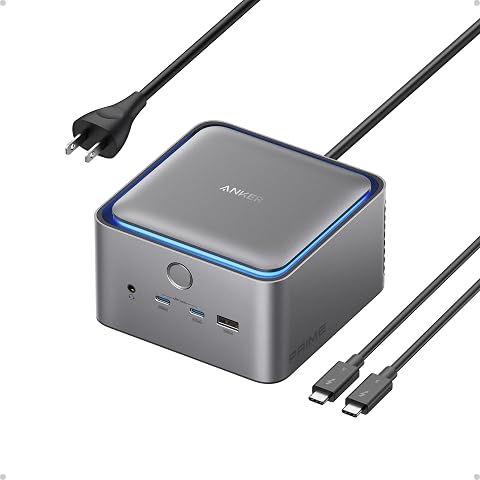 Anker Prime 14-in-1 Thunderbolt 5 Docking StationView on Amazon →
- 2
 Dell Pro Thunderbolt 4 Smart Dock SD25TB4 – USB-C Station 130W, 4 Displays 4K…View on Amazon →
- 3
 Plugable Thunderbolt 4 Dock with 100W Charging, Dual MonitorView on Amazon →
- 4
 Plugable Thunderbolt 4 Dock (TBT-UDM) for Mac and WindowsView on Amazon →
- 5
 Dell WD19TB Thunderbolt Docking Station with 180W AC AdapterView on Amazon →
- 6
 Dell Thunderbolt Dock WD19TBS with 130W Power DeliveryView on Amazon →
Match the Dock to Your Laptop
The comparison matters because a dock becomes the connection point for displays, storage, networking, and charging. Choosing one that does not match the laptop can leave a buyer paying for bandwidth that the computer cannot use, or finding that a screen configuration does not work as expected. The guide’s strongest practical message is to check the full computer-and-monitor setup before buying.
That check is especially relevant when replacing a laptop charger. The source distinguishes the WD19TB’s listed 180W adapter from the WD19TBS’s 130W Power Delivery, and calls out Plugable’s 100W charging model. Adapter wattage and power delivered to a laptop are not necessarily interchangeable measures. Buyers should compare the dock’s charging output with their computer’s requirements, particularly if they use a demanding laptop under load.
Generation is another tradeoff, not a guarantee of better results for every desk. A Thunderbolt 5 dock may offer more headroom, but a host computer needs compatible capabilities to benefit. For a Thunderbolt 4 laptop and a routine office setup, the guide suggests that a Thunderbolt 4 dock may be a more fitting purchase.
Products Worth Considering

LG UltraGear 32-inch QHD Curved Gaming Monitor, 180Hz, 1ms, AMD FreeSync

Bose QuietComfort Ultra Headphones (2nd Gen), Wireless Noise Cancelling Over-Ear Headphones, Driftwood Sand

DJI Mic Wireless Lavalier Microphone System with 2 Transmitters, 1 Receiver, and Charging Case
As an affiliate, we earn on qualifying purchases.
Six Models, Different Desk Needs
The source groups the six products around two connection generations: one Thunderbolt 5 dock and five Thunderbolt 4 choices. Its ordering favors the Anker for newer-generation bandwidth, then identifies different fits among Plugable’s models and Dell’s current and WD19 options. The guide places the older WD19 variants lower, advising buyers to pay particular attention to their power configuration and compatibility.
Rather than treating docks with similar names as interchangeable, the author says the comparison accounts for the practical configuration being sold. The distinction between the two WD19 models, and between Plugable’s cross-platform and 100W-focused options, reflects that approach. However, the supplied source does not give a full port-by-port specification table, prices, test methods, or measured results for all six products.
The guide also advises buyers to identify the monitors’ resolution, refresh rate, and inputs and to check the host computer’s display limits. Windows and Mac systems may handle external displays differently, while adapters and connection types can add further constraints. These checks apply to the complete setup, not just the dock’s headline port count.
“A dock’s port count alone does not guarantee that every screen or peripheral will work as expected.”
— ThorstenMeyerAI.com buying guide
Compatibility and Test Details
The source does not specify the guide’s publication date, prices, or testing methodology, and provides no measured performance results. The 2027 framing comes from the requested article title; the supplied material does not establish that these models were newly released or tested in 2027.
It is also not clear from the supplied details which exact resolutions, refresh rates, or combinations of monitors each dock supports across specific laptop models and operating systems. The source itself says those results can vary by host. Buyers should confirm the dock maker’s compatibility information and their computer’s specifications before relying on a particular display arrangement or charging output.
Check Your Setup Before Buying
The next step for buyers is to compare their laptop’s exact port and power specifications with the dock’s supported operating systems, charging output, and display modes. They should list the monitors’ resolutions, refresh rates, and connection types, then confirm that the computer can drive the intended screens through the chosen dock.
For a final choice, compare the ports that will be used at the same time and decide whether Thunderbolt 5 headroom is useful for the host computer. The source offers no confirmed release schedule, price changes, or follow-up testing, so those details remain open rather than established developments.
Key Questions
Which dock does the guide rank first?
ThorstenMeyerAI.com ranks the Anker Prime 14-in-1 Thunderbolt 5 Dock first, citing its newer-generation bandwidth and broad connection focus. The source does not include benchmark data or pricing.
Which Plugable dock is aimed at 100W charging?
The guide describes a Plugable Thunderbolt 4 model rated for 100W charging as focused on charging and dual-monitor use. It presents the TBT-UDM as a separate cross-platform option.
Are the Dell WD19TB and WD19TBS the same configuration?
No. The source distinguishes the WD19TB’s listed 180W adapter from the WD19TBS’s 130W Power Delivery and advises checking laptop power requirements.
Will a dock’s listed monitor support work with every laptop?
No. The source says display results depend on the computer, operating system, and monitor connections. Confirm the laptop’s display limits and the exact screen configuration before purchasing.
Source: ThorstenMeyerAI.com