Finding a reliable 2 in 1 laptop under 1500 for client presentations can be a challenge, especially when balancing performance and portability. The Lenovo Yoga 7i stands out as the best overall choice, offering a sharp 16″ 2K touchscreen and solid performance. For those prioritizing portability, the Dell Latitude 14” FHD provides a compact form factor with business-grade features, while the HP OmniBook 14” offers a powerful specs set for demanding presentation needs. The main tradeoffs involve balancing screen size, battery life, and processing power within the budget. Continue reading for a detailed breakdown of each option and how they compare.

Get business pricing on tech for your team
- Business-only prices and quantity discounts
- Tax-exempt purchasing
- Multiple users, one account, clear invoices
Key Takeaways
- The best overall pick, Lenovo Yoga 7i, combines a large high-resolution display with versatile 2-in-1 functionality, ideal for frequent presenters.
- Portability often comes with tradeoffs in screen size; smaller models like Dell Latitude 14” are easier to carry but may offer less immersive displays.
- Performance specs vary significantly; models with i7 processors and 16GB+ RAM are better suited for multitasking during presentations.
- Build quality and durability are essential for frequent use; some renewed options provide high specs at a lower price but might risk longevity.
- Battery life remains a common challenge; models with larger batteries or power-efficient components outperform in longer presentation settings.
| Lenovo Yoga 7i 2-in-1 Laptop, 16″ 2K Touchscreen Display, Core Ultra 7 155U |  | Best Overall for Versatility and Power | Display: 16-inch 2K Touchscreen | Processor: Intel Ultra 7 155U, 12-core | Resolution: 1920 x 1200 | VIEW ON AMAZON | See Our Full Breakdown |
| 15.6-inch 2-in-1 Touchscreen Laptop with 8GB RAM and 256GB SSD |  | Best for Budget-Conscious Users Who Value Portability | Display: 15.6-inch IPS FHD (1920×1080) | Processor: Intel m3-8100Y | RAM: 8GB | VIEW ON AMAZON | See Our Full Breakdown |
| HP OmniBook 5 Flip 14″ 2-in-1 Touchscreen Laptop with Intel Core i7, 16GB RAM, 1TB SSD, Windows 11 Pro, Silver |  | Best for Power Users Needing Large Storage and Professional Features | Display: 14.0″ 1920 x 1200 Touchscreen | Processor: Intel Core i7 150U, 1.80GHz | RAM: 16GB DDR5 | VIEW ON AMAZON | See Our Full Breakdown |
| Dell Latitude 7420 2-in-1 Business Laptop, 14” FHD Touchscreen (Renewed) |  | Best for Enterprise and Security-Focused Users | Screen Size: 14 inches | Display: FHD Touchscreen, anti-glare | Processor: Intel Core i7-1165G7 | VIEW ON AMAZON | See Our Full Breakdown |
| 15.6-inch 2-in-1 Touchscreen Laptop with 16GB RAM and 256GB SSD |  | Best for Balanced Performance and Versatility | Display: 15.6-inch 1080P Full HD | Processor: Intel Core i5-7Y54 | RAM: 16GB | VIEW ON AMAZON | See Our Full Breakdown |
| ASUS Vivobook Flip 14″ 2-in-1 OLED Touchscreen Laptop with Docking Station |  | Best Overall for Versatile Presentations and Performance | Display: 14-inch WUXGA OLED Touchscreen | Processor: Intel Core Ultra 7 256V | RAM: 16GB LPDDR5 | VIEW ON AMAZON | See Our Full Breakdown |
| Dell Latitude 13.3″ 2-in-1 Touchscreen Laptop with Intel Core i7, 32GB RAM, 512GB SSD, Gray Aluminum (Renewed) |  | Best for High-Performance Business Use | Display: 13.3-inch FHD+ Touchscreen | Processor: 13th Gen Intel Core i7 | RAM: 32GB | VIEW ON AMAZON | See Our Full Breakdown |
| HP EliteBook x360 1040 G8 14″ Touch Laptop (Renewed) |  | Best for Versatile Professional Use on the Go | Display: 14-inch Full HD touchscreen | Processor: Intel i7-1165G7 | RAM: 16GB | VIEW ON AMAZON | See Our Full Breakdown |
| 15.6″ Yoga 2-in-1 Touchscreen Laptop, 8GB RAM 256GB SSD | 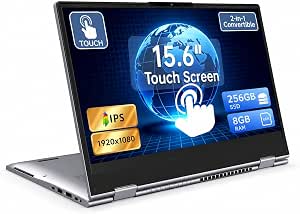 | Best Budget 15.6″ Convertible for Casual Presentations | Display: 15.6-inch IPS LCD, 1920×1080 | Processor: AMD A9 CPU (up to 3.2GHz) | RAM: 8GB | VIEW ON AMAZON | See Our Full Breakdown |
| in 1 laptop for client presentations under 1500 | Display | Processor | RAM | Storage |
|---|---|---|---|---|
| Lenovo Yoga 7i 2-in-1 Laptop | 16-inch 2K Touchscreen | Intel Ultra 7 155U, 12-core | — | — |
| 15.6-inch 2-in-1 Touchscreen L | 15.6-inch IPS FHD (1920×1080) | Intel m3-8100Y | 8GB | 256GB SSD |
| HP OmniBook 5 Flip 14" 2-in-1 | 14.0" 1920 x 1200 Touchscreen | Intel Core i7 150U, 1.80GHz | 16GB DDR5 | 1TB SSD |
| Dell Latitude 7420 2-in-1 Busi | FHD Touchscreen, anti-glare | Intel Core i7-1165G7 | 16GB | 512GB SSD |
| 15.6-inch 2-in-1 Touchscreen L | 15.6-inch 1080P Full HD | Intel Core i5-7Y54 | 16GB | 256GB SSD |
| ASUS Vivobook Flip 14" 2-in-1 | 14-inch WUXGA OLED Touchscreen | Intel Core Ultra 7 256V | 16GB LPDDR5 | 2TB SSD (1TB SSD + 1TB Docking Station) |
| Dell Latitude 13.3" 2-in-1 Tou | 13.3-inch FHD+ Touchscreen | 13th Gen Intel Core i7 | 32GB | 512GB SSD |
| HP EliteBook x360 1040 G8 14" | 14-inch Full HD touchscreen | Intel i7-1165G7 | 16GB | 512GB SSD |
| 15.6" Yoga 2-in-1 Touchscreen | 15.6-inch IPS LCD, 1920×1080 | AMD A9 CPU (up to 3.2GHz) | 8GB | 256GB SSD |
More Details on Our Top Picks
Lenovo Yoga 7i 2-in-1 Laptop, 16″ 2K Touchscreen Display, Core Ultra 7 155U
The Lenovo Yoga 7i stands out for its large 16-inch 2K touchscreen, making it ideal for detailed presentations and interactive demos. Its 12-core Intel Ultra 7 155U processor ensures smooth multitasking, surpassing the performance of the HP OmniBook 5 Flip, which has a slightly less powerful CPU. The Yoga’s versatile modes—including tent and tablet—offer flexible presentation setups, but this premium feature set comes with a higher price and limited battery info. Compared to the Dell Latitude 7420, it offers a more immersive display at the expense of potentially shorter battery life. This pick is best suited for professionals who need a large, high-performance device for frequent client meetings and versatile usage scenarios.
Pros:- Large 16-inch 2K touchscreen with vivid visuals
- Powerful 12-core processor suited for multitasking
- Multiple modes including tent and tablet for presentation flexibility
- Enhanced connectivity options with WiFi 6E and multiple ports
Cons:- No specific battery life details provided, which could impact portability
- Higher price point may be restrictive for budget-conscious buyers
Best for: Business professionals who prioritize a large, vibrant display and high processing power for frequent presentations
Not ideal for: Travelers needing a lightweight, ultra-portable device with long battery life, as the Yoga 7i is relatively heavy and premium-priced
- Display:16-inch 2K Touchscreen
- Processor:Intel Ultra 7 155U, 12-core
- Resolution:1920 x 1200
- Operating System:Windows 11
- Connectivity:WiFi 6E, Gigabit LAN
- Ports:2x USB Type-A, 2x Type-C, HDMI, Micro SD Card Reader
Our verdict“This laptop best serves professionals who need a large, high-performance 2-in-1 for frequent client presentations and versatile usage.”
15.6-inch 2-in-1 Touchscreen Laptop with 8GB RAM and 256GB SSD
This 15.6-inch 2-in-1 offers a flexible 360° flip touchscreen at a more affordable price than the Lenovo Yoga 7i, making it suitable for smaller spaces and lighter work. While its Intel m3-8100Y processor isn’t as powerful as the Core i7 options, it’s sufficient for basic presentations and multitasking, especially when compared to the Dell Latitude 7420’s more professional but less portable design. The device’s Full HD IPS display provides clear visuals, but the limited 256GB SSD storage could be restrictive for users handling large files or multiple presentations. Its lightweight form factor favors those who need a portable device, but the less robust processor and modest storage mean it’s better for occasional use rather than intensive tasks. This model makes the most sense for budget-conscious professionals or students needing a reliable, portable presentation device.
Pros:- Flexible 360° hinge for multiple presentation modes
- Affordable price point with decent performance for daily tasks
- Full HD IPS display for clear visuals
- Lightweight and portable for easy travel
Cons:- Processor may struggle with intensive multitasking or large files
- Limited to 256GB storage, which can fill quickly
Best for: Freelancers or students who need a portable, affordable 2-in-1 for casual client meetings and classroom presentations
Not ideal for: Power users requiring high processing power or extensive storage, as the processor and SSD are limited
- Display:15.6-inch IPS FHD (1920×1080)
- Processor:Intel m3-8100Y
- RAM:8GB
- Storage:256GB SSD
- Touchscreen:Yes, 360° flip
- Ports:HDMI, USB 3.0, USB 2.0, Type-C
Our verdict“Best suited for budget-conscious users needing a portable, versatile device for light to moderate presentation tasks.”
HP OmniBook 5 Flip 14″ 2-in-1 Touchscreen Laptop with Intel Core i7, 16GB RAM, 1TB SSD, Windows 11 Pro, Silver
The HP OmniBook 5 Flip offers a compact 14-inch display with a high-resolution 1920×1200 touchscreen, making it a solid choice for detailed presentations in tight spaces. Its Intel Core i7 processor and 16GB RAM outperform many competitors like the Dell Latitude 7420, especially for multitasking and demanding applications. The large 1TB SSD is a clear advantage over models with smaller storage, supporting extensive presentation files and professional workflows. However, its smaller screen size might be less engaging for audiences compared to larger options like the Yoga 7i. Weighing portability against screen real estate, this model is ideal for professionals who need a powerful, space-efficient device with substantial storage. It’s particularly well-suited for frequent travelers and consultants working on complex projects.
Pros:- Powerful Core i7 processor with 16GB RAM for multitasking
- Large 1TB SSD offers extensive storage capacity
- Compact 14-inch size ideal for portability
- Windows 11 Pro with backlit keyboard and multiple ports
Cons:- Smaller 14-inch display may be less immersive for presentations
- Premium price may be prohibitive for some users
Best for: Consultants or professionals who need a powerful, portable 2-in-1 with ample storage for complex presentations and multitasking
Not ideal for: Users who prioritize larger screens for group presentations or prefer ultra-lightweight devices for frequent travel
- Display:14.0″ 1920 x 1200 Touchscreen
- Processor:Intel Core i7 150U, 1.80GHz
- RAM:16GB DDR5
- Storage:1TB SSD
- Weight:3.64 lbs
- Ports:2 USB Type-C, 2 USB Type-A, HDMI
Our verdict“This device is best for professionals who need a compact, high-performance 2-in-1 with large storage for demanding work and frequent travel.”
Dell Latitude 7420 2-in-1 Business Laptop, 14” FHD Touchscreen (Renewed)
The Dell Latitude 7420 combines a professional-grade 14-inch FHD touchscreen with enterprise security features, making it ideal for corporate environments. Its Intel Core i7-1165G7 processor and 16GB RAM deliver solid performance, comparable to the HP OmniBook 5 Flip, but with added emphasis on security and manageability. The 512GB SSD provides ample space for presentations and documents, while the anti-glare display reduces eye fatigue during long meetings. As a refurbished model, it offers a cost-effective option for businesses, though it may lack the pristine condition and accessories of new devices. It’s best for those valuing durability, enterprise-level security, and reliable performance over ultra-light portability. This makes it suitable for professional environments requiring robust security and multitasking.
Pros:- Powerful Core i7 processor with 16GB RAM for multitasking
- Secure Windows 11 Pro environment with enterprise features
- Anti-glare FHD touchscreen reduces eye strain
- Decent 512GB SSD for professional storage needs
Cons:- Refurbished condition might lack accessories and original packaging
- Size and weight are less portable compared to smaller models
Best for: Business users needing a secure, reliable, and manageable device for frequent client interactions
Not ideal for: Travelers seeking the lightest possible device or those who prefer brand-new gadgets with full warranty
- Screen Size:14 inches
- Display:FHD Touchscreen, anti-glare
- Processor:Intel Core i7-1165G7
- RAM:16GB
- Storage:512GB SSD
- Operating System:Windows 11 Pro
Our verdict“Ideal for enterprise environments where security, durability, and performance outweigh ultra-lightweight design.”
15.6-inch 2-in-1 Touchscreen Laptop with 16GB RAM and 256GB SSD
This 15.6-inch 2-in-1 offers a familiar size for multitasking and presentations, combining a 360° hinge with a capable Intel Core i5 processor and 16GB RAM. Compared with the Lenovo Yoga 7i, it provides a more balanced mix of performance and portability for users who prefer a slightly smaller form factor but still want versatility. Its 256GB SSD is comparable to the other budget options but may limit storage for large presentation files or media. The device’s Full HD display and secure fingerprint sensor add to its appeal, although it lacks dedicated graphics for intensive tasks. It’s best for users who need a flexible device that can handle everyday productivity and moderate presentation needs without the bulk of larger models.
Pros:- Versatile 360° hinge for multiple modes
- Good performance with 16GB RAM and i5 processor
- Full HD display with secure fingerprint unlocking
- Pre-installed with Windows 11 Pro and Office 365
Cons:- Limited 256GB storage may fill quickly
- No dedicated GPU for graphic-intensive applications
Best for: Small business owners or educators seeking a versatile, affordable 2-in-1 for daily presentations and work tasks
Not ideal for: High-end professionals requiring maximum storage or graphics performance for complex visual content
- Display:15.6-inch 1080P Full HD
- Processor:Intel Core i5-7Y54
- RAM:16GB
- Storage:256GB SSD
- Hinge:360° rotating
- Security:Fingerprint unlock
Our verdict“This model suits users who need a flexible, mid-sized 2-in-1 for everyday tasks and moderate presentations at an affordable price.”
ASUS Vivobook Flip 14″ 2-in-1 OLED Touchscreen Laptop with Docking Station
The ASUS Vivobook Flip 14 stands out for its stunning OLED display and flexible 2-in-1 design, making it ideal for presenting with vivid visuals in client meetings. Compared with the Dell Latitude 13.3″, it offers a larger, more vibrant screen but adds weight, which could impact portability. Its powerful Intel Core Ultra 7 processor and 16GB RAM support multitasking and AI tools, surpassing many lightweight options like the Yoga 2-in-1. The included docking station with 2TB storage enhances connectivity and workspace setup, though the 3.46-pound weight and limited ports may challenge portability and expandability. This pick is best suited for professionals who prioritize visual quality and performance but don’t mind carrying a slightly heavier device. The premium features come at a higher price point, and its weight might be a concern for those frequently on the move.Pros:- Vivid OLED touchscreen enhances visual clarity for presentations
- Powerful Intel Core Ultra 7 processor handles multitasking and AI tools
- Large 2TB storage with docking station supports extensive files and accessories
- Versatile 2-in-1 design for both laptop and tablet modes
Cons:- Heavier than many ultraportables at 3.46 lbs, impacting portability
- Limited ports for expanding peripherals, requiring external hubs or docks
Best for: Design professionals or consultants who need vibrant visuals and robust multitasking capabilities during client presentations.
Not ideal for: Travel-heavy users or those needing ultra-lightweight devices, as its weight and limited port options could hinder mobility.
- Display:14-inch WUXGA OLED Touchscreen
- Processor:Intel Core Ultra 7 256V
- RAM:16GB LPDDR5
- Storage:2TB SSD (1TB SSD + 1TB Docking Station)
- Graphics:Intel Arc Graphics
- Weight:3.46 lbs
Our verdict“This device is perfect for professionals needing vibrant visuals and high performance, accepting some portability tradeoffs.”
Dell Latitude 13.3″ 2-in-1 Touchscreen Laptop with Intel Core i7, 32GB RAM, 512GB SSD, Gray Aluminum (Renewed)
The Dell Latitude 13.3″ offers a compact form factor with a 13.3-inch display, making it easier to carry than larger models like the ASUS Flip. Its 13th Gen Intel Core i7 and 32GB RAM deliver impressive speed, especially for multitasking, outperforming the HP EliteBook in raw power. The renewed status might raise concerns about warranty and long-term reliability, but its high-performance hardware makes it suitable for demanding tasks. The 512GB SSD provides sufficient storage for most files, though less than the ASUS option’s 2TB. This model is ideal for business users who need speed and portability, but those seeking brand new devices or longer warranties should look elsewhere. The smaller screen may limit visual impact during presentations compared to larger options, but it enhances mobility.Pros:- Powerful 13th Gen Intel Core i7 processor accelerates workflow
- Large 32GB RAM supports heavy multitasking
- Highly portable with a compact 13.3-inch design
- Fast 512GB SSD for quick data access
Cons:- Renewed device may have limited warranty and unknown long-term reliability
- Smaller display size may reduce visual impact in presentations
Best for: Business professionals who need high-speed multitasking and portability for frequent client meetings.
Not ideal for: Users requiring the largest screen for detailed visuals or those who prefer brand-new devices with full warranty coverage.
- Display:13.3-inch FHD+ Touchscreen
- Processor:13th Gen Intel Core i7
- RAM:32GB
- Storage:512GB SSD
- Color:Gray Aluminum
- Weight:Lightweight and portable
Our verdict“This model suits users prioritizing speed and portability, accepting some concerns about warranty and screen size.”
HP EliteBook x360 1040 G8 14″ Touch Laptop (Renewed)
The HP EliteBook x360 1040 G8 excels in versatility with its 360-degree hinge, supporting multiple modes for presentations and note-taking. Its bright 14-inch FHD touchscreen with 400 nits makes outdoor viewing feasible, giving it an edge over less luminous screens like the Yoga 2-in-1. The Intel i7 processor and 16GB RAM ensure smooth multitasking, yet the renewed condition raises questions about battery life and warranty. The 512GB SSD provides fast storage, but may be limiting for larger files compared to the ASUS or Dell options. This laptop is best for those who need flexibility and mobility in professional environments, but users who prefer brand-new devices or longer-lasting batteries should consider alternatives. Its premium build and bright display justify its higher price, despite potential wear from previous use.Pros:- Versatile 360-degree flip design supports multiple modes
- Bright 14-inch display with 400 nits for outdoor use
- High-performance Intel i7 processor with 16GB RAM
- Fast data transfer via Thunderbolt
Cons:- Renewed device may have limited warranty and unknown battery performance
- Potential wear and tear due to pre-owned status
Best for: Mobile professionals who require flexible modes and bright screens for outdoor presentations or meetings.
Not ideal for: Users seeking a brand-new device with comprehensive warranty or those handling extremely large files regularly.
- Display:14-inch Full HD touchscreen
- Processor:Intel i7-1165G7
- RAM:16GB
- Storage:512GB SSD
- Brightness:400 nits
- Connectivity:Thunderbolt, WiFi 6
Our verdict“Best for professionals needing flexible, bright displays in portable packages, with some caution on renewal status.”
15.6″ Yoga 2-in-1 Touchscreen Laptop, 8GB RAM 256GB SSD
The Yoga 2-in-1 offers a larger 15.6-inch display that makes visuals more impactful during client presentations, especially compared to smaller options like the HP EliteBook. Its 8GB RAM and 256GB SSD fulfill basic multitasking needs but fall short for demanding workloads or large media files. The AMD A9 CPU limits its ability to handle intensive tasks, making it better suited for light presentations and everyday use rather than high-performance scenarios. Its full HD IPS display delivers vibrant colors, but the entry-level processor and modest storage mean it’s less future-proof. This device is ideal for budget-conscious buyers who prioritize screen size and portability over raw power and storage capacity. Those handling complex files or seeking long-term reliability should consider more powerful or newer models.Pros:- Large 15.6-inch IPS touchscreen enhances visual impact
- Convertible design allows easy switching between laptop and tablet modes
- Affordable price point for entry-level users
- Full HD resolution with vibrant colors
Cons:- Limited processing power with AMD A9 CPU, unsuitable for demanding tasks
- Small 256GB SSD may quickly fill up or limit storage expansion
Best for: Small-business owners or freelancers needing a large touchscreen for casual client presentations on a tight budget.
Not ideal for: Power users or professionals requiring high performance and storage for intensive tasks or large media files.
- Display:15.6-inch IPS LCD, 1920×1080
- Processor:AMD A9 CPU (up to 3.2GHz)
- RAM:8GB
- Storage:256GB SSD
- Graphics:Radeon R5
- Operating System:Windows 11
Our verdict“A practical choice for budget-conscious users seeking a larger screen for casual presentations, but not suited for intensive workloads.”

How We Picked
Our evaluation focused on performance, display quality, portability, build durability, and value within the $1500 budget. We prioritized laptops with solid processing power, especially those with latest-generation Intel or AMD chips, to handle multitasking and presentation software smoothly. Display size and resolution were key for clear visuals during client meetings, while lightweight and battery life factors determined portability. We also considered user reviews and brand reliability to ensure the options are practical for frequent use. The ranking reflects a balance between these factors, highlighting models that best meet the needs of professionals delivering presentations on the go.Factors to Consider When Choosing 2 In 1 Laptop For Client Presentations Under 1500
Choosing the right 2 in 1 laptop for client presentations under 1500 involves balancing multiple factors. Beyond raw specs, consider how the device feels during use, its portability, and how well it handles your presentation software. Making the right tradeoffs can significantly impact your experience, so understanding the key considerations can prevent costly mistakes and ensure you select a device that truly fits your needs.Display Size and Resolution
For client presentations, display clarity and size matter greatly. A larger screen, such as 14 or 16 inches, offers better visibility, especially in larger rooms. Resolution is equally important; a 2K or higher display provides sharper visuals, making your slides look professional without color distortion or pixelation. However, larger displays tend to add weight and reduce portability, so consider where you’ll be presenting most often and choose accordingly.
Performance and Processing Power
Presentation tasks usually demand reliable performance, especially if you run multiple apps or multimedia content. Look for laptops with at least an Intel Core i5 or AMD Ryzen 5 processor, but ideally an i7 or Ryzen 7 for smoother multitasking. RAM should be 8GB minimum, with 16GB offering more headroom. Skipping on performance can lead to lag during crucial moments, so investing slightly more for a stronger processor can pay off in reliability.
Portability and Battery Life
If you frequently move between meetings or work remotely, portability and battery life are critical. Lighter models with a weight under 3 pounds make it easier to carry, while batteries lasting 8+ hours ensure your device can power through multiple presentations without recharging. Beware of models with smaller batteries or heavier builds that may limit your mobility or cause anxiety during longer sessions.
Build Quality and Durability
Frequent travel and daily use demand a sturdy build. Metal chassis or reinforced hinges help prevent damage, especially when handling the device during setup or breakdown. Some renewed or refurbished options can offer high specs at a lower price, but check for quality assurance to avoid units prone to wear or failure. A well-built laptop minimizes downtime and replacement costs over time.
Connectivity and Ports
Reliable presentation setups depend on versatile connectivity options. Ensure the laptop includes multiple USB ports, an HDMI or DisplayPort output, and a headphone jack. USB-C ports with Thunderbolt support can add flexibility for connecting external displays or accessories. Limited port options can force you to carry extra adapters, which can complicate quick setups and break the flow of your presentation.
Frequently Asked Questions
Will a 2 in 1 laptop under 1500 handle demanding presentation software?
Most models in this price range are equipped to run typical presentation software like PowerPoint, Keynote, or Google Slides smoothly. For more demanding tasks such as video editing or multitasking with multiple high-resolution files, focus on units with at least an Intel Core i7 processor and 16GB of RAM. While budget options may suffice for standard presentations, investing in higher specs ensures performance remains steady under pressure.
How important is touch screen functionality for client presentations?
Touch screens can enhance interactivity during presentations or allow for quick annotations, which can be a plus in certain professional settings. However, not all presenters find touch functionality essential; a traditional laptop with a good display may suffice. If you plan to use touch features frequently, prioritize models with responsive, durable touch screens that don’t compromise battery life or overall performance.
Should I consider refurbished or renewed laptops within this budget?
Refurbished or renewed devices can offer high-end specs at a lower price, making them attractive options. However, they may carry risks related to wear and limited warranties. Always buy from reputable sources that provide guarantees and check for return policies. For frequent travel or critical presentations, a new device might provide more peace of mind and longer-lasting durability.
What screen size is best for mobility without sacrificing visibility?
Models around 13.3 to 14 inches strike a good balance between portability and usability. They are light enough to carry easily but still offer enough screen real estate for clear, readable presentations. Larger displays, like 15.6 inches, are better for detailed visuals but tend to be bulkier and heavier, which could hinder mobility if you’re often on the move.
How much should I spend to get a durable 2 in 1 for frequent use?
Investing up to $1500 allows access to premium features like metal chassis, reinforced hinges, and high-quality displays. These build qualities extend the lifespan of your device, especially if you move between locations often. Skimping on build quality to save money can lead to faster wear and more frequent repairs, which ultimately costs more over time.
Conclusion
For those who need the best overall performance and display quality, the Lenovo Yoga 7i offers a balanced mix of power, size, and versatility, making it suitable for frequent presenters. Budget-conscious buyers who want reliable performance without sacrificing portability might prefer the Dell Latitude 14”, especially for daily use. Beginners or infrequent presenters should consider simpler options that prioritize ease of use and battery life. Power users, such as those running demanding apps or needing high durability, should explore renewed premium models with reinforced builds. Ultimately, your choice depends on your specific presenting environment and how much you’re willing to invest in durability and performance.